At every stage of the data capture process, TeleForm validates extracted information to ensure that all content is fully verified and accurate before it is delivered into business processes and repositories.
TeleForm Verifier is the last application in the process. After the batches have been processed by TeleForm Reader, any data entry fields that were not evaluated with sufficient confidence are held for review and displayed in the Verifier module, with operators able to make instant decisions on borderline characters.
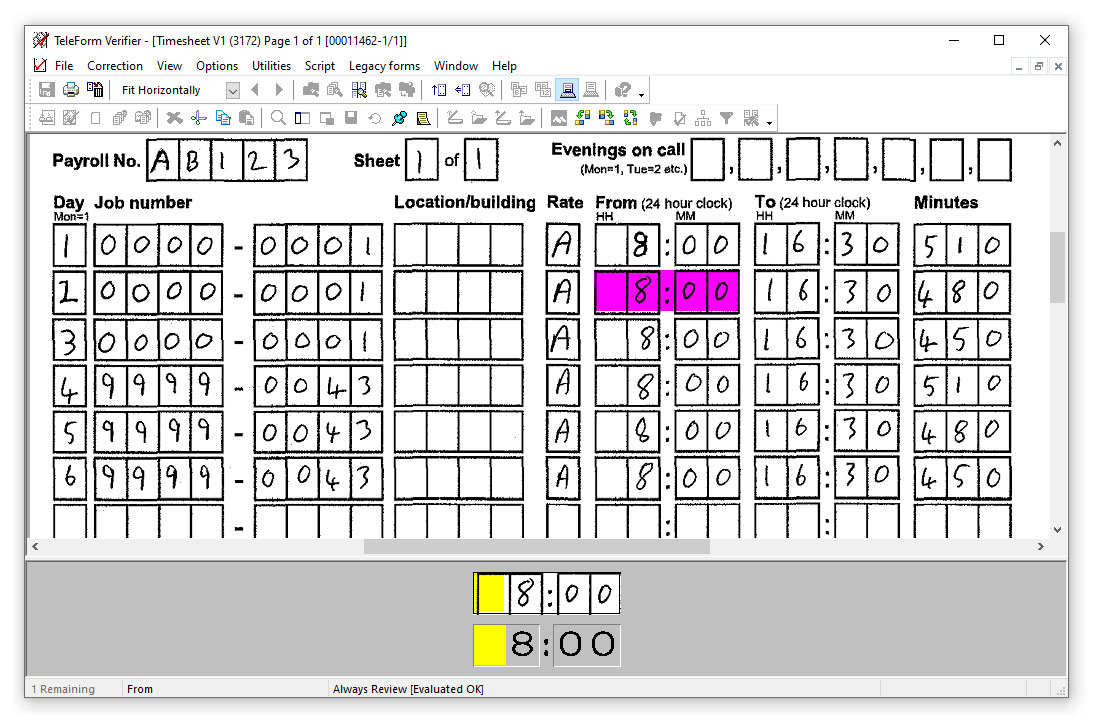
You can enforce simple rules such as numeric, alpha fields, date ranges and dictionary lookups at this stage. In addition, it is possible to build complex data validations and lookups through Microsoft Visual Basic for Applications scripting interface or .NET with C# or VB in Microsoft Visual Studio. Examples include validating bank details against Experian Bank Wizard and/or addresses against the electoral register using eSearch.
Confidence thresholds for the verification stage can be set on a form template basis. The typical confidence threshold for a production system is around 85% for a character to bypass human verification.
To minimise keystrokes, only invalid or unrecognisable data is highlighted to an operator.
Once misread characters have been corrected and the data meets your pre-defined business rules, it can be exported or archived.


Case studies

Colyton Grammar School processes its 11-plus entrance examination in two days using ePC’s scanning bureau services and automated marking system.

NEXT Distribution automated the weekly processing of its productivity bonus scheme timesheets for 4,500 employees across six UK distribution centres. The TeleForm-based solution saved two days of processing time every week – approximately 750 hours a year.

Midland Management Services (MMS) saves 37.5 hours every week and has reduced manual data entry by 80% using a TeleForm-based timesheet automation system.