Exam management software for vocational and professional qualifications
Vocational and professional qualifications offer practical training and skills development and allow individuals to study and gain the knowledge required to work in specific professions.
An efficient assessment process is a vital part of delivering qualifications. However, many professional bodies continue to rely on examiners to manually mark exam scripts.
At ePC, our exam management software accelerate grading, increase process visibility, and reduce costs for professional bodies.
Understanding your challenges
There are several challenges for providers of workplace, vocational and professional qualifications who manually mark paper exams. These include:
Manual marking
Professional bodies recruit new markers to manually grade high volumes of exam scripts. Examiners are suitably qualified in the subject and/or experienced in the industry and paid for their work. Marking is usually carried out in the evening or at weekends in addition to their jobs.
During peak periods, they may need to recruit additional examiners who are usually experts in the field and paid for their work, so this can come at a high cost.
Human error
Manually marking inevitably results in human error as grading scripts over an extended period can lead to fatigue while tight deadlines put pressure on staff to release results, potentially risking accuracy.
Additional oversight and monitoring are required to ensure consistency and to quickly spot and improve poor marking.
Time consuming
Marking paper-based exams is labour-intensive, particularly during peak exam periods.
Beyond the human time and effort required, additional time is lost to logistics and physically shipping papers between test centres, HQ and markers, adding days or weeks to the overall process.
Logistics
Printing, distributing, marking, and archiving large-scale paper exams is time-consuming and expensive. It requires significant planning and coordination while the risk of script loss and damage is high.
Due to the out-of-hours nature of this marking, and the markers often working remotely, it introduces additional complexity, cost and above all, risk to the logistics of delivering papers to the markers when they need them.
Specialist OMR scanners
Some providers of vocational and professional qualifications use OMR scanners to scan and mark paper-based multiple-choice questions, reducing the workload for human markers. However, these answer sheets are limited to a single page and the rigid grid-based system limits the design and structure of tests.
In addition, students must use pencil and need to write their name, date, student/seat number on space-consuming and complicated grids of tick-boxes. It is also important for students to not cross out an answer and check another option, as this will cause exceptions in the OMR scanners.
At the same time, the OMR scanners require specialist printing of the answer sheets which means it can be expensive to set-up and maintain.
Exam management services
Some of the key features of automated capture and marking with TeleForm include:
- Answer sheet design
- Scanning candidate responses
- Script identification and data extraction
- Answer sheet verification
- Data export

Staff can design flexible answer sheets in a drag-and-drop form designer.
Powerful features allow you to setup data entry fields to capture data from answer sheets, perform lookups, enforce data validation rules, and set-up automatic exports.
Once form templates are created, you can merge data (student name, number etc.) onto form fields to create personalised forms before distribution via PDF, print, or eMail.

When the students have filled in their answer sheets, they will be returned to the exams office, department or module owner who will scan the completed answer sheets into TeleForm using a connected high-speed document scanner.
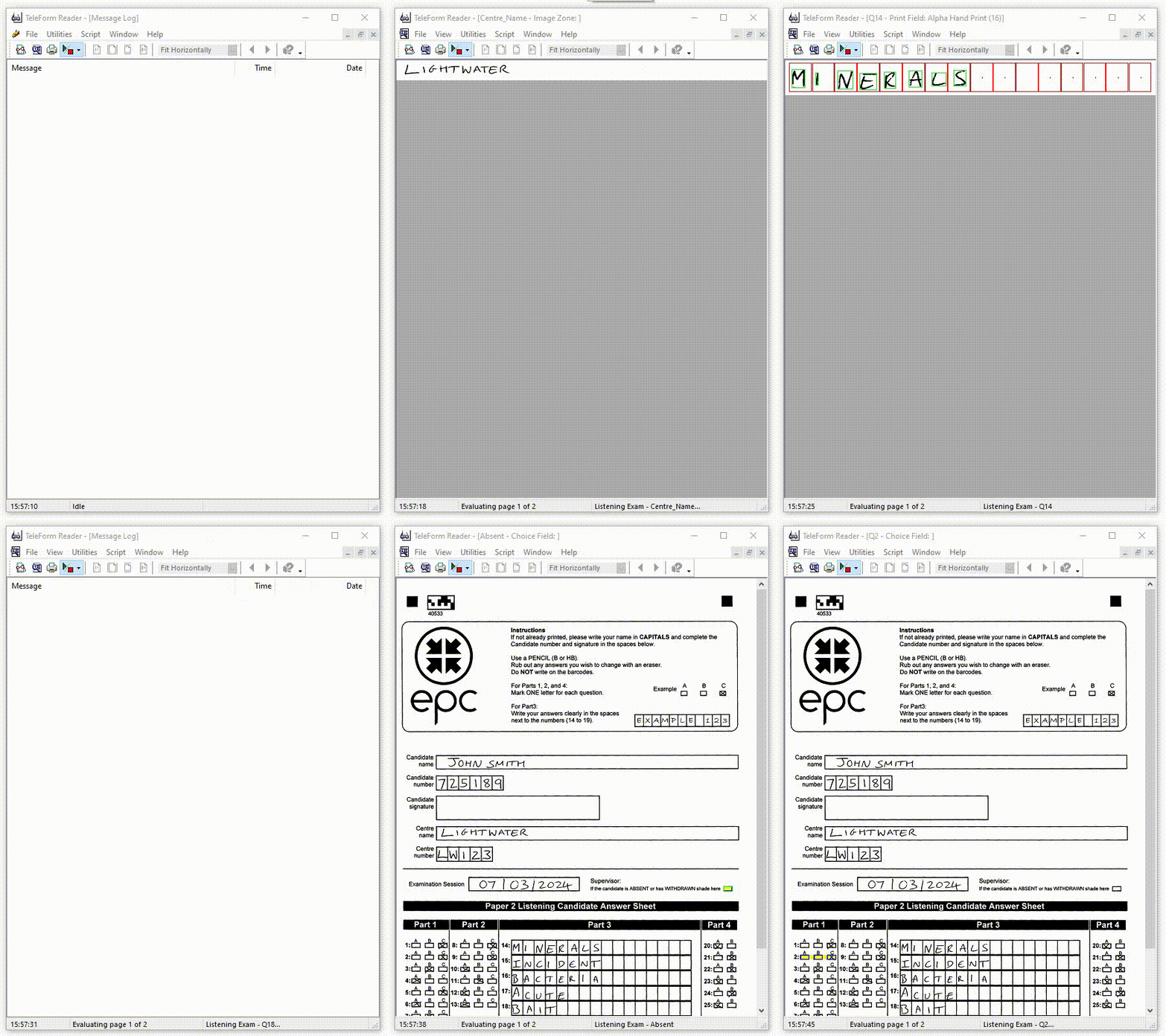
Once the images are captured, automated data processing software will identify the answer sheet based on the template type.
At this stage, the image will undergo image pre-processing to confirm barcode readability, page size, presence of cornerstones etc.
After identifying a form, intelligent character recognition (ICR), optical character recognition (OCR), and optical mark recognition (OMR) technology will extract data from the scanned answer sheets.
Simple rules such as alpha, numeric, dictionaries, date ranges, database lookups and mandatory fields will be checked at this stage with exceptions queued for human review.
Automated marking for MCQs
OMR technology can, for example, read candidate responses to MCQs and export a value for each question (i.e. A, B, C, D). Alternatively, OMR can mark each question (if pre-loaded with the answer-key) and export a final score (rather than raw responses).

During the verification stage, the software will flag any answers that require a human decision.
If human verification is required, images of answer sheets needing review are displayed in an intuitive interface with staff able to confirm the intended responses or correct misread characters with minimal keystrokes before moving to the next image.

Export data to common file formats such as Excel, CSV, SPSS or SQL Server etc.
Export data from scanned scripts to third-party systems such as learning management software (e.g. Blackboard) or OSM systems (e.g. Janison, MarkManager).
Image archival
Instead of taking up space with bulky paper storage, digital images of the papers can be stored electronically, backed up, and accessed for re-marking and investigations.
Automated marking benefits
Exam management software offers several benefits over manual marking and OMR scanners for high stakes exams. These include:
Reduce manual marking
By scanning exam scripts, professional bodies can reduce the marking burden on examiners with MCQs and short-written responses automatically marked and exported to standard file formats or awarding systems while responses to essay-style questions are manually marked or made available to OSM systems for marking electronically.
Built-in quality control
During the scanning phase, real-time quality controls resolve issues quickly to improve the quality of scanned images and reduce exception handling later in the process.
Quality control features such as double-marking and data review can be built into the electronic process with only a few clicks.
Improve efficiency
Candidate scripts are available for marking shortly after the end of the exam, allowing you to accelerate the marking cycle and publish results faster.
Replace OMR scanners
Flexible form design (not a rigid grid-based system) allows you to design accessible answer sheets.
Pre-print answer sheets with variable data (student name, number, test date, location etc.).
In addition to multiple-choice questions (MCQ), capture short written responses for short answer questions (SAQs).
No specialist hardware is required with TeleForm compatible with ISIS, Kofax, and TWAIN compliant scanners.
Integration with marking systems
Relevant response areas from scanned exam scripts – linked to enrolments – can be exported to third-party marking systems for examiners to mark in a secure, online environment.
Reduce costs
Significant cost savings can be realised by reducing marker workload, logistics, and third-party storage.
Latest news
Book demo
An efficient assessment process is a vital part of delivering qualifications and continued professional development (CPD) to your membership.
TeleForm is the perfect solution for professional bodies seeking an alternative to manual marking and specialist OMR software for short answer and MCQ exams.
Call 03300 100 000 or complete our form to discuss your requirements.
We will not share your details outside of our organisation and will only contact you to discuss your enquiry. Read our privacy policy.


