Replace SharePoint with Process Director

With workflow functionality in SharePoint retired and InfoPath Forms discontinued, many organisations are reviewing the market for a SharePoint alternative.

Process Director is the perfect SharePoint alternative.

Speak to an expert

03300 100 000

Request callback

SharePoint challenges

SharePoint is an excellent information and document repository, but it cannot effectively apply business rules, supply adequate governance capabilities and, most importantly, it requires the work of a team of software developers and administrators to manage all but the most basic functionality effectively.

Whether you are considering SharePoint or planning to replace it, we recommend you consider SharePoint alternatives due to a number of common challenges.

The basics are very basic

Whilst it is possible to very quickly achieve some useful results, the starter templates and user interfaces are crippled by their ease of use. As soon as you get into the detail, you quickly realise another level of effort is required…

The detail is very complex

If you have complex requirements or just need to meet your specific methods of operation, it is likely to be beyond SharePoint’s basic capabilities. This will force you in to needing specialist skills and custom coding, which is time-consuming and expensive to maintain.

Performance issues

With hosted SharePoint imposing throttling to allow fair resource usage as well as limits on data storage, performance can be poor.

SharePoint users may experience delays and/or sluggish perfromance when performing tasks, accessing files, or collaborating with other users.

Steep learning curve

With so many tools and features, Microsoft SharePoint can take a long time to learn properly, especially if you are starting from scratch.

Overwhelming product set

With SharePoint sitting alongside Power Apps, Power Automate, Power BI, Azure, Microsoft 365, Office, and Exchange as one part of the overall Microsoft offering, it can be overwhelmingly complex to work out what products you need, let alone understanding what it will cost you.

Unpredictable costs

Microsoft have attempted to simplify pricing by bundling services together. For example, if you want Power BI Pro, that comes with no less than 24 other services you may or may not want!

Long-term support

With such a broad portfolio, the threat of Microsoft withdrawing support for your product is an ever-present danger.

Replace SharePoint workflows with Process Director

Process Director is a business process automation platform and a great alternative to SharePoint workflows. The platform empowers citizen developers and IT teams to build business applications that automate and optimise their most critical processes.

new-hire-request
Forms

Process Director provides several ways of building user-friendly electronic forms, with the results appearing the same to end users.

These include an online form designer (OFD) for easy drag-and-drop creation and the Microsoft Visual Studio-based builder, aimed at .Net developers who require advanced technical features.
sequential-workflows
Workflows

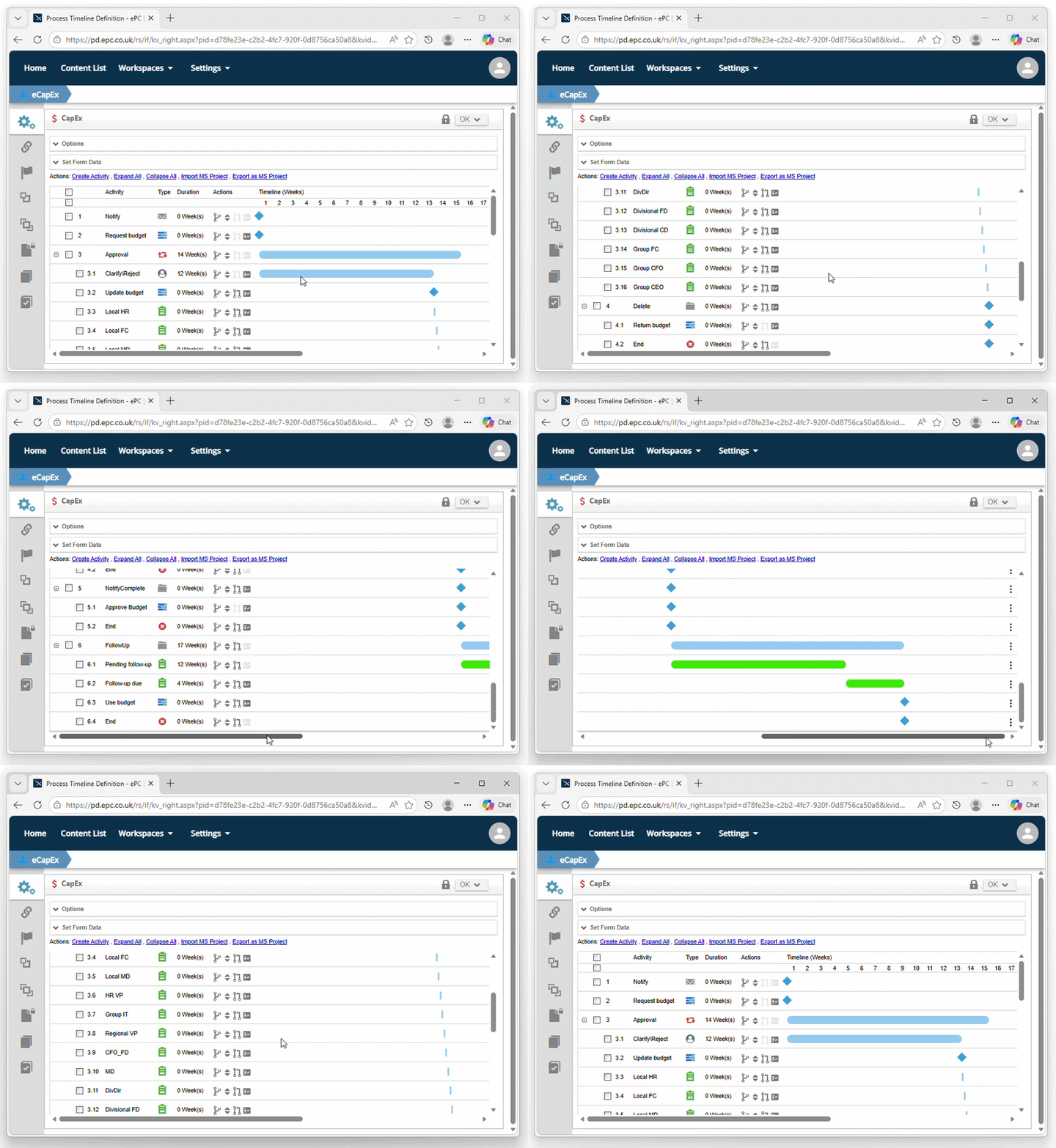
Process Director transforms how you design, automate and manage complex business processes.

Using an intuitive Gantt-chart interface, it allows multiple activities to run concurrently, tracks progress against expected completion times and predicts potential delays before they impact your operations.

With Process Timeline, you can improve process efficiency, accelerate completion times and gain greater control over business-critical operations.

user-friendly-interface
Dashboards and reporting

Web workspaces serve as the primary interface to the system, enabling authorised users to:

  • Initiate new processes
  • View task lists
  • Search archive forms
  • Export data

The web workspaces also serve as intuitive dashboards, providing real-time visibility into your business processes. The dashboards contain task lists, tabular data, and chart/graph widgets to display real-time metrics, including project status and cycle times.

You can also apply filters, download pre-configured reports, or schedule them for automatic distribution.

Export data in various formats (CSV, XLS, PDF, SPSS, and more).

low-code
Low-code

Empower business users – with knowledge of their department’s pain points – to build forms, workflows and interfaces in weeks rather than months with low-code development.

Process Director’s low-code development environment enables both business and IT users to create and modify applications without extensive coding requirements.

A graphical interface empowers users to build feature-rich applications with point-and-click tools, templates by use case, and pre-built connectors. No coding is required.

Case management

Thanks to the patented Process Timeline™, Process Director is the perfect fit for case management work, orchestrating and adapting workflows in response to real-world changes.

The low-code platform provides an adaptive case management workflow that allows case workers to make decisions, assign tasks, and collaborate effectively to promptly resolve complex cases.

application-integration
Integrations

Process Director supports direct integration, web services and REST/SOAP calls, giving you access to a huge variety of in-house and third-party services.

Its .NET Software Development Kit (SDK) enables near-limitless capabilities to create reusable, bespoke custom tasks and integrations.

Additionally, you can export data to flat file formats (e.g., CSV, Excel).
audit-trails
Security
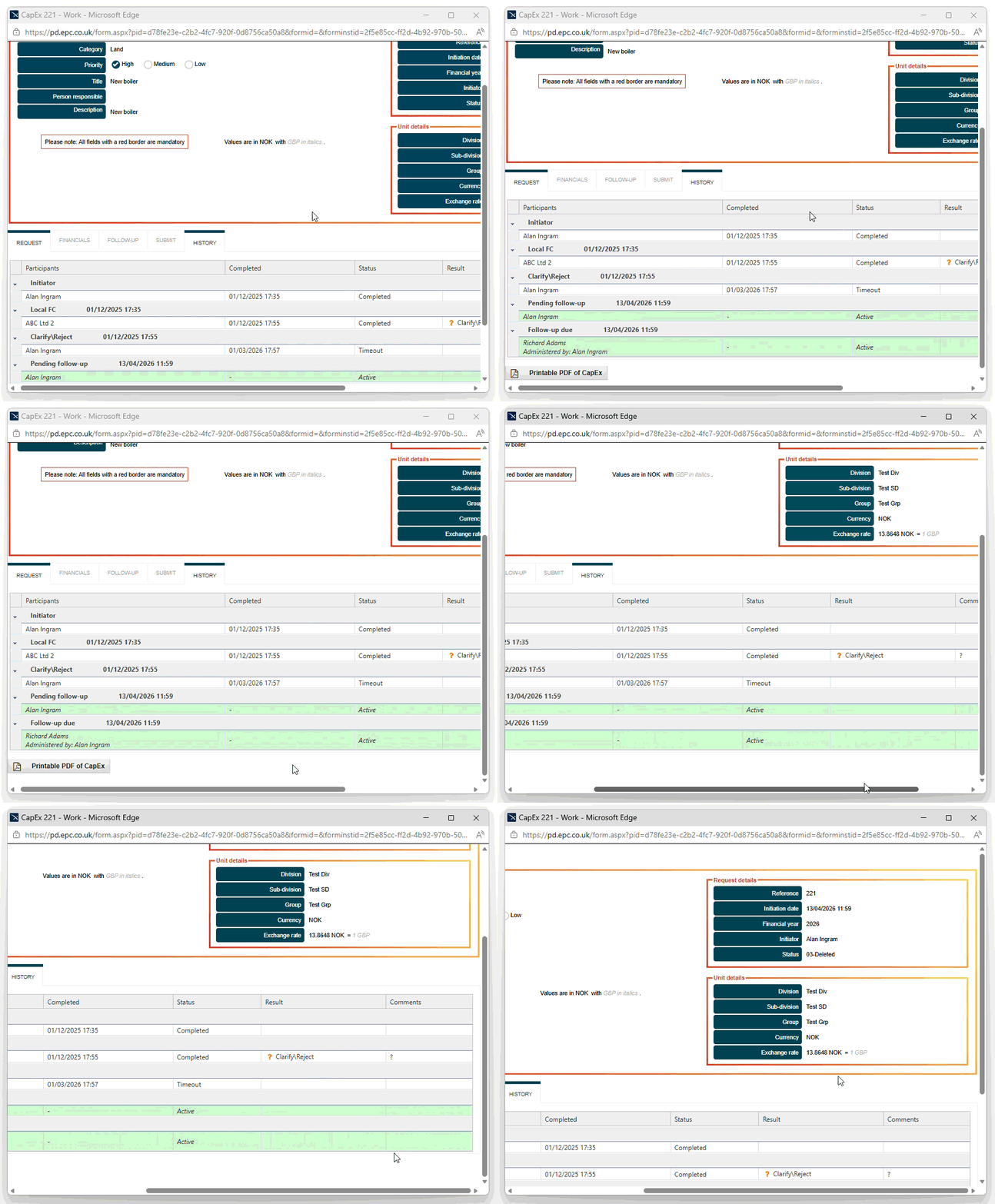
  • Full audit trail of all transactions and user activity
  • Role-based access control (RBAC)
  • Single Sign-On (SSO) via Microsoft Entra ID, Active Directory (AD) and other providers through SAML 2.0.
  • Multi-factor authentication (MFA)
  • Data encryption in transit and at rest
  • Centralised document management
  • Cloud-based hosting in a UK-based, ISO 27001-certified data centre or Microsoft Azure global infrastructure
  • 99.95% uptime commitment for cloud deployments
  • On-premises deployment
  • G-Cloud and Digital Outcomes and Specialists approved
  • Cyber Essentials certified
Compare platform features

Process Director vs. SharePoint

Process Director is a leading low-code process automation platform and one of many alternatives to SharePoint. Learn how it compares to Process Director below:

Capability Process Director SharePoint
Complex workflow nesting and chaining Fully supports complex nesting and chaining of workflows Limited support; custom coding required, making it difficult and expensive
Process centricity Multi-centric (human, document, event, automated) processes Primarily document-centric; not well-suited for process management
Available process patterns Offers extensive process patterns and configurations Limited to two process patterns: sequence and machine state
Governance and compliance Comprehensive governance and compliance capabilities, including audit tracking No governance or audit tracking capabilities
Case management Out-of-box case management functionality No native support; requires custom development
User implementability Business users can implement processes without IT assistance Requires IT specialists for implementation
Integrate with legacy/enterprise platforms Seamlessly integrate with existing systems Limited integration options
Business rules engine
Predictive notifications
Predictive automated actions
Data virtualisation
Time-based process action triggers
ML/AI for automated decision making
Partner/supplier/customer applications
5-stars
As an IT support group, we offer our business colleagues choices. The decision to select Process Director/Cloud Edition was made by the Divisional CFO, as the prototype of the CapEx process worked to his satisfaction. From an IT perspective, we were also genuinely pleased with the pilot.
Chris Broe, Group Chief Information Officer, Rentokil Initial
stars
We love the simplicity of the system. The actual form has not changed much. You now complete it online. It still captures all the same information. Crucially, the quality of submitted requests has improved as certain fields are auto-filled, calculated automatically or contain rules such as a mandatory field or display a warning if certain conditions are not met. We’ve made the process tighter and more consistent.
Nick Taylor, Finance Director, Millennium Hotels and Resorts
stars
We were mindful of the CapEx – and product creation – systems ePC had implemented and aware they worked well. In the end, the system had a lot of ticks against it and we did not see the value of going to another supplier when ePC had a box of tricks that worked well for us.
Robert Woods, Finance Manager, Initial
stars
ePC offers a strong technical knowledge of BP Logix Process Director, and the ability to understand complex business processes. We consider the company a premier resource for BPM implementations using Process Director.
Jay O’Brien, Chief Executive Officer, BP Logix
    Compare process patterns

    Process Director v SharePoint

    SharePoint’s limited number of process patterns restricts the flexibility and options available for modelling and managing business processes.

    Process pattern Process Director SharePoint
    Sequential process
    State machine
    Parallel
    Conditional
    Looping
    Sub process
    Escalation
    Human-centric
    Event-driven
    Timer-based
    Case management
    Dynamic routing
    Compare platform features

    Process Director vs. MS Power Apps

    Microsoft encourages SharePoint users to migrate to Power Automate, which is part of the Microsoft Power Platform alongside MS Power Apps.

    In the table below, we compare Process Director to MS Power Apps.

    Capability Process Director MS Power Apps
    Complex process modelling and execution
    Workflow nesting and chaining, dynamic routing
    Power Apps lacks the advanced features required to execute processes that involve multiple steps, stages, and conditional routing.
    Predictive notifications and automation
    Proactive decision-making with automated alerts and actions
    Limited Users can set up simple event-based alerts and notifications in Power Apps, but it does not offer predictive analytics that automatically identifies issues and help organizations optimize processes.
    Data virtualisation
    Integration with diverse systems for real-time data access
    Limited Power Apps integrates with systems like SharePoint, SQL, or Oracle, but lacks seamless integration for real-time data access across diverse sources.
    Time-based process triggers
    Optimised scheduling/execution for time-sensitive processes
    Limited Power Apps offers basic time-triggered actions but lacks support for complex multi-step workflows and event-driven actions.
    Governance and compliance
    Dedicated GRC emphasis suitable for regulated industries
    Limited Power Apps lacks the GRC features essential for highly regulated industries, including robust audit tracking, compliance reporting, and data security measures.
    Business rules engine
    Support for complex business logic and enforcement
    Limited Power Apps offers basic rule-setting options, but it struggles to support more intricate business rules, conditional routing, or case-specific decision-making.
    Dynamic routing
    Automated task assignment based on rules
    Power Apps lacks automated task assignments based on complex rules or conditions, necessitating manual handling or basic rule sets.
    Event-driven automation
    Automated actions based on events
    Limited Power Apps supports basic event-triggered actions but lacks advanced event-driven automation capabilities required to respond to a wide range of events/ conditions.
    Case management
    Support for end-to-end case handling
    Limited Power Apps lacks native support for end-to-end case management, hindering the management of cases involving multiple stages, approvals, and interactions.
    Microsoft system integration
    Integrates seamlessly with Microsoft systems
    Both Process Director and Power Apps integrate perfectly within a Microsoft environment.
    Legacy system integration
    Old ERP software, on-premises databases, custom-built apps
    Limited Power Apps’ lack of compatibility with certain legacy systems means that integrations may require additional effort and development work.

    While Microsoft offer users incredibly powerful products and tools, Power Apps is not robust enough to fully meet the requirements of automating complex and highly regulated business processes.

    Process Director offers advanced process modelling capabilities, robust compliance features, and the ability to seamlessly integrate with Microsoft environments —making it the superior choice for businesses seeking a tailored solution for their complex automation needs.

    Book demo

    Are you considering a SharePoint workflow alternative to automate approval workflows?

    Call 03300 100 000 or complete our form to discuss your requirements.

      We will not share your details outside of our organisation and will only contact you to discuss your enquiry. Read our privacy policy.