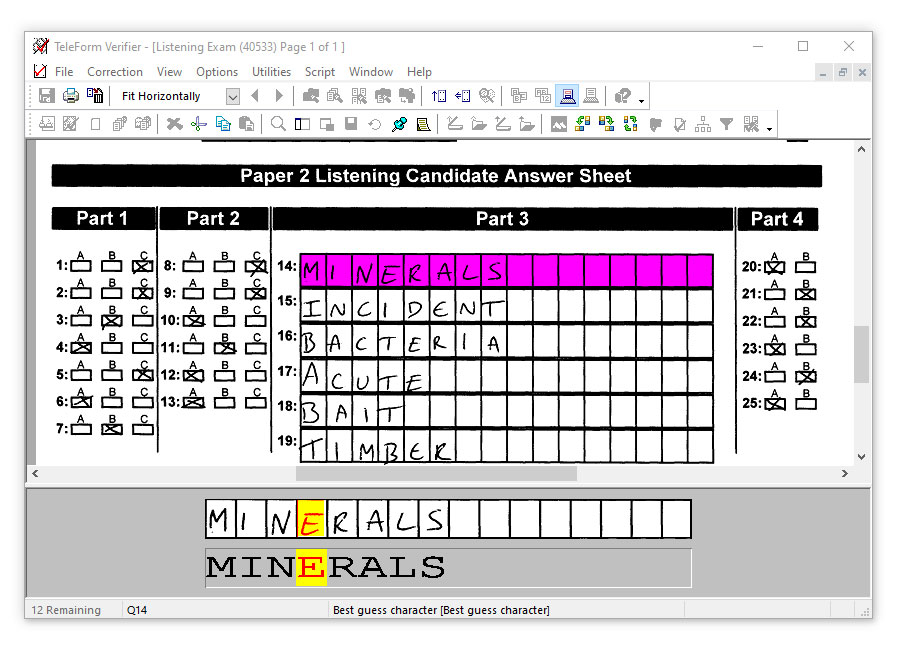
On-site installation
First, if the system is installed on-site, your staff will review uncertain characters in the TeleForm Verifier. This is a high-speed application designed to capture the maximum amount of data with the minimum human intervention.
Scanning bureau
If you opt for our scanning bureau service, our verification team will review any ambiguous or borderline candidate responses for you.
eVerify
Thirdly, for distributed test centres, the eVerify app allows users to confirm the intended responses or correct misread characters in a web-accessible, high-speed verification interface.

Once verified, electronic images and data are exported to any required format or made available for marking in on-screen marking systems. Some of the key features include:
Intuitive interface
Web-based dashboards allow the verification team to be geographically dispersed with 24-hour/365 days a year processing available.
Batch management
Upon login, operators are presented with the batch management page.
By default, this shows the oldest batches first and only batches requiring review to ensure you release candidate results in a timely manner.
Verification
When a user selects a batch, they are presented with a verification screen that shows each image in a batch for review. Only problematic fields are highlighted to the user with visual hints to highlight the questionable fields on the full-page images.
Keyboard driven
As each character or field is corrected, the cursor automatically moves to the next character or field needing review. This increases productivity and makes verification a quick and simple process requiring minimal keystrokes.
Request re-scans
If a page is unreadable or of insufficient quality, the verification team can request a re-scan from the test centre.
Manage duplicate images
The system displays a duplicate warning if mismatched items are identified with operators unable to continue until they have reviewed the duplicate (previously verified) scan and decided how to proceed. They have the option to retain, re-assign, discard or append the duplicate to the first image.
Audit logs
Detailed audit trail of all user actions, including who performed which action and when, against which item and candidate enrolment.
System response time
System performance is designed to maximise response time and cut valuable time off every user action. This is crucial as saving milliseconds across thousands of daily actions will save a huge amount of time. And money!
For example, for one client, the addition of one second to the processing time for each answer sheet (across a typical exam session of 35,000 candidates) would result in nearly 40 hours of additional processing time. This would risk missing marking targets.
Progress reporting
Monitor progress and produce reports highlighting the number of images pending review, completed, or escalated to a supervisor.
Team management messaging is also available.
Indexing data for marking
Once verified, the indexed data can be exported to third-party on-screen marking solutions (OSM).
Archival and retrieval
Secure, long-term storage of scanned candidate responses for future reference.
The system allows users to drill-down and view any current or recent session materials and export scanned images to upstream marking and archival systems with old sessions purged after a configurable period.
Scalable
The system is highly scalable with key components available to purchase in a modular fashion to meet your throughput needs. It performs under significant loads such as heavy usage during peak periods while the system architecture supports unlimited concurrent users and records.
Case studies

Colyton Grammar School processes its 11-plus entrance examination in two days using ePC’s scanning bureau services and automated marking system.

Following an OJEU tender process, the British Council commissioned Civica as the prime contractor to deliver an on-screen marking (OSM) solution to mark up to 5 million ‘pen and paper’ IELTS tests each year.
As part of the agreement, Civica appointed ePC as its sub-contractor for the script capture, processing and verification work.

Cambridge English automated paper-based assessments with an exam processing and on-screen marking system, supporting the processing of millions of assessments each year.
Related products
ePartner Consulting combines decades of technical expertise with proven technology to deliver practical, scalable solutions tailored to the way your organisation works.

TeleForm automatically captures and indexes data and images from any form type, using handprint (ICR), machine print (OCR) and checkbox (OMR) recognition technology, ready for export to a database.


