eXam is a modular platform for high-stakes paper based exams that performs the following functions:
- Generation of blank and personalised answer sheets
- Electronic distribution of exam papers, answer sheets, and other materials directly to test venues
- Script capture, processing, verification, and export of indexed data from scanned scripts to third-party on-screen marking solutions
- Auto-marking and verification for multiple-choice questions and short written responses
- On-screen marking of long and short written responses
At ePC, we understand that every organisation is different, every assessment is tailored, and each candidate is unique. There is no one-size-fits-all solution, so we draw upon the platform components to design and build a bespoke process that suits your organisation.
Use cases
Adaptable to wide variety of use cases, eXam is a modular platform for high-stakes exams.
Platform components
Our solutions are modular and available as standalone products to integrate with your existing infrastructure, or as an end-to-end capture solution.
- Answer sheet design
- Exam paper distribution
- Scanning candidate responses
- Script identification and data extraction
- Answer sheet verification
- On-screen marking

A structured exam sheet will be designed for each component and optimised for higher capture rates.
The sheet can offer multiple layout possibilities with intelligent character recognition (ICR) reading short written responses and optical character recognition (OCR) capturing machine-printed text and Optical mark recognition (OMR) marking answers to multiple-choice questions (MCQ).
Additionally, the answer paper can include cornerstones and ID blocks to reduce manual intervention and barcodes to identify answer paper types and candidates.

Pre-printed and blank answer papers (APs) as well as supporting materials can be made available in one of two ways, depending on your deployment option.
First, they can be dispatched by courier to your school/college/university/test centre.
Second, they can be made available online and grouped by component and/or candidate, ready for downloading and printing. Once received, exam papers can be printed professionally, if the volume requires it, or simply on office printers for smaller volumes.
For larger deployments, a web portal (see image) is available where venues can test their scanning, download and print QPs and APs, scan completed APs, monitor progress, fulfil re-scan requests and reconcile scanning.

The next step is to convert the answer scripts into a digital format for processing. This is achieved in one of three ways, depending on your deployment option.
Firstly, if the system is installed on-site, staff will scan answer sheets using a high-speed scanner.
Secondly, for distributed deployments in remote locations, the eScan app is available via a link on the web portal, offering scanning, reconciliation, error rectification and transmission of answer sheets.
Thirdly, if you opt for our scanning bureau service, we will collect the completed answers sheets and process them accordingly.
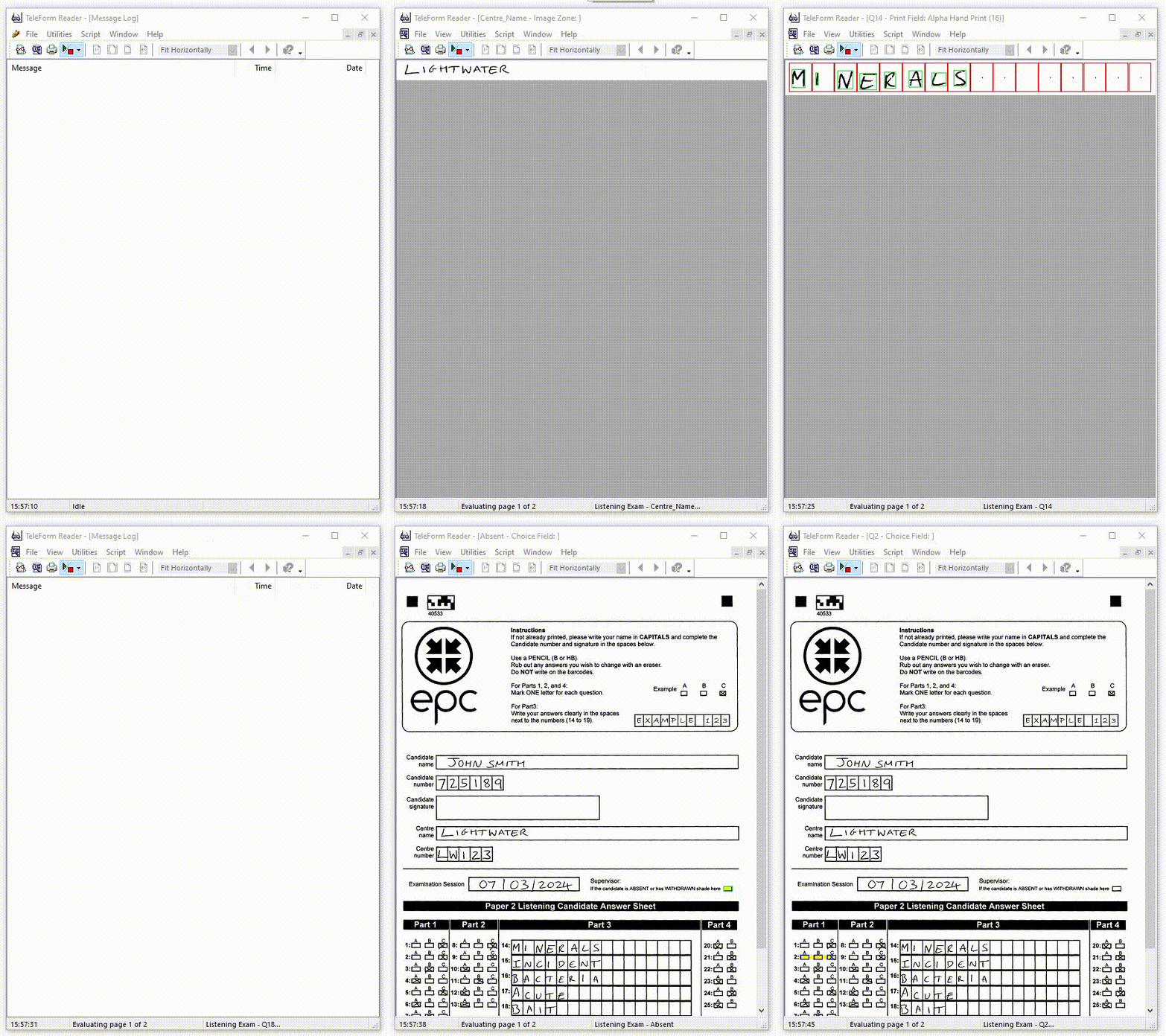
Once the images are captured, the system will identify the answer sheet based on the template type.
At this stage, the image will undergo image pre-processing to confirm barcode readability, page size, presence of cornerstones etc.
After identifying a form, intelligent character recognition (ICR), optical character recognition (OCR), and optical mark recognition (OMR) technology will extract data from a scanned answer sheet.
Simple rules such as alpha, numeric, dictionaries, date ranges, database lookups and mandatory fields will be checked at this stage with exceptions queued for human review.
Automated marking for MCQs
OMR technology can, for example, read candidate responses to MCQs and export a value for each question (i.e. A, B, C, D). Alternatively, OMR can mark each question (if pre-loaded with the answer-key) and export a final score (rather than raw responses).
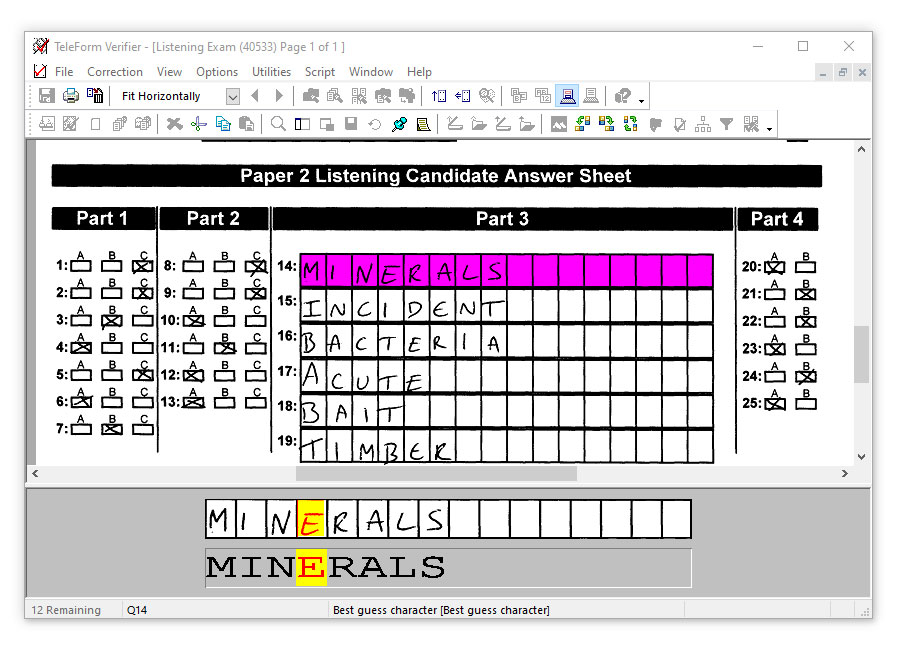
The next step is to review any unclear papers and verify extracted data. We have deployment options to suit all kinds of test organisations.
First, if the system is installed on-site, your staff will review uncertain characters in the TeleForm Verifier. This is a high-speed application designed to capture the maximum amount of data with the minimum human intervention.
Second, if you opt for our scanning bureau service, our verification team will review any ambiguous or borderline candidate responses for you.
Third, for distributed test centres, the eVerify app allows users to confirm the intended responses or correct misread characters in a web-accessible, high-speed verification interface.
Once verified, electronic images and data are exported to any required format or made available for marking in on-screen marking systems.
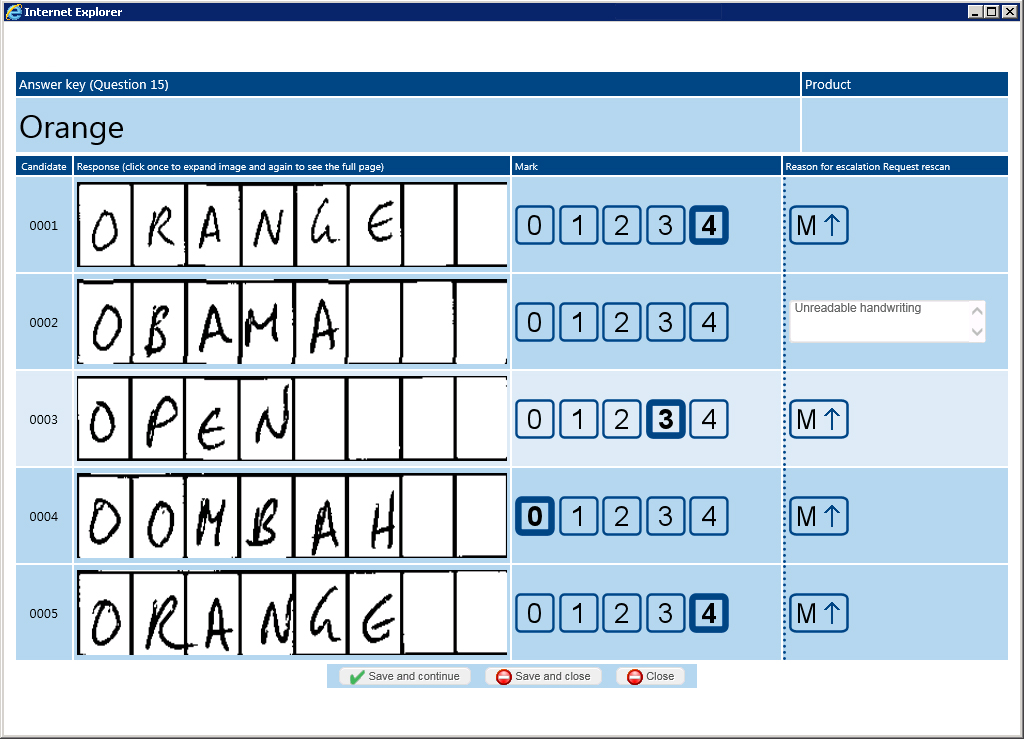
The on-screen marking component (see image) extracts the relevant response areas from scanned images and presents them to remote examiners for clerical marking in a secure, online environment.
Alternatively, if you already have an OSM system, data from scanned scripts can be indexed and exported to your third-party solution.
Whether you’re a national hub processing millions of papers every year, distributed centres capturing a few hundred papers per day, or a school looking to process an ad-hoc exam, we have a deployment option to suit.
Small volume
Our scanning bureau service is designed for limited use environments with small volumes or infrequent use such as admissions testing and 11 plus exams.
Our services includes:
- Design and print answer papers (APs)
- Deliver pre-printed or blank APs and other materials
- Capture, classify, extract, and validate data from returned APs
- Export data to any required format
- Electronic storage and retrieval of scanned answer sheets
Mid volume
Mid volume is suitable for schools/colleges/universities and professional bodies who run exams at several centres or locations.
This option includes the installation of data capture software at a designated hub. Individual venues will collect completed answers at the end of the exam and arrange for secure delivery to the hub for scanning and processing.
Our service includes:
- Design APs (training is available to enable your staff to design APs)
- Install data capture software and document scanner at the designated hub
- Deliver user training to enable your staff to process returned answer sheets
- Provide ongoing technical support and maintenance
Enterprise
This deployment is suitable for enterprise clients and awarding bodies who process high volumes of returned scripts at a single, centralised location.
Our services include:
- Design APs (training is available to enable your staff to design APs)
- Provide PDFs of answer sheets (and other materials) for venue staff to print locally on standard office printers or to be printed centrally at a professional print shop
- Install multi-user scanning infrastructure at the central hub
- User training for users to process returned answer sheets
- Ongoing technical support and maintenance
Distributed
Distributed is suitable for enterprise clients and awarding bodies who process high volumes of test papers from remote venues/centres across the world.
Our services include:
- Design blank or pre-printed personalised APs
- Web portal for centres to download and print APs and other materials (e.g., exception reports)
- Remote web scanning with the eScan app to capture and classify completed APs at the test centre and to have them uploaded back to HQ
- Remote verification with the eVerify app to confirm intended responses or correct misread characters on APs in a web-based interface
- Data export to third-party OSM systems for on-screen marking or standard file formats
- Web portal dashboards to provide real-time status monitoring of any session or venue
- Ongoing technical support and maintenance
Built-in features
Flexible and easy to use features to support a modular and more progressive approach to script capture, processing, verification, and marking.
| Exam paper design | |
| QP/AP redesigned and optimised for distributed printing and scanning | |
| Barcoded personalised test papers (with candidate name, number, centre, session date, component etc.) | |
| Non-personalised (blank) test papers | |
| Multiple question types e.g. MCQ (multiple choice questions), short answer, long text, and drawing or diagram areas | |
| Barcoded to identify candidates and reconcile answer sheets | |
| Question randomisation | |
| Web portal for exam paper distribution | |
| Single sign on (SSO) for secure worldwide access | |
| Custom branding | |
| Download personalised QP/AP from the portal for printing | |
| Download non-personalised QP/AP from the portal for printing | |
| Print test pages to calibrate printer/scanner settings | |
| Dashboard reports monitoring the status of any session or centre | |
| Request regeneration of PDF packs | |
| Mark as re-scan required / unscannable / absent | |
| Accept last-minute candidates and amendments | |
| Launch scanning module via the portal | |
| Image scanning | |
| Scan AP’s at the venue immediately after an exam | |
| Real-time validation of AP’s | |
| Traffic light warnings to alert users to problems with scanned images | |
| Uninterrupted scanning in the event of poor Internet connectivity | |
| Exception reporting to identify absent candidates or malpractice investigations | |
| Batch reference number generated upon successful transmission of images (‘proof of delivery’) | |
| Image conversion and extraction | |
| Image pre-processing e.g. image correction for skew, scanner distortion and print margin adjustment | |
| Identify AP & candidates | |
| Read constrained print fields (one cell per letter/number/character) | |
| Read multiple choice questions with optical mark recognition (OMR) | |
| Read short written responses with intelligent character recognition (ICR) | |
| Read machine printed text with optical character recognition (OCR) e.g. pre-printed candidate details (name, school, date of birth) | |
| Minimum confidence thresholds | |
| Image verification | |
| Display character or field for an operator to review | |
| Minimise keystrokes with operators automatically progressing to the next character or field for review | |
| Request re-scan if an image is unreadable or insufficient quality | |
| Make decisions about duplicate images (retain, re-assign, discard or append) | |
| Export data to any required format e.g., CSV, Excel | |
| Export data to third-party on-screen marking (OSM) solutions | |
| On-screen marking | |
| Item level marking | |
| Bulk item entry (submit ‘correct marks for all’) | |
| Submit marks | |
| Team management structure (Admin User, Team Leader, Monitor, Marker) | |
| Quality assurance rules enforced (double marking, error rates, marker probation periods, escalations, hierarchical marker monitoring) | |
| Access to noticeboard and support messaging system | |
| Remote marking |
Case studies

Following an OJEU tender process, the British Council commissioned Civica as the prime contractor to deliver an on-screen marking (OSM) solution to mark up to 5 million ‘pen and paper’ IELTS tests each year.
As part of the agreement, Civica appointed ePC as its sub-contractor for the script capture, processing and verification work.
Eliminate costly, time-consuming, and error-prone manual data entry with TeleForm. The following statistics were observed during a pilot scheme for one education client.
1
1.5
57%
97%
3
Related products
ePartner Consulting combines decades of technical expertise with proven technology to deliver practical, scalable solutions tailored to the way your organisation works.
Latest news
Book demo
eXam is an end-to-end assessment platform for high stakes exams that provides script capture, processing and verification and on-screen marking.
Call 03300 100 000 or complete our form to discuss your requirements.
We will not share your details outside of our organisation and will only contact you to discuss your enquiry. Read our privacy policy.


